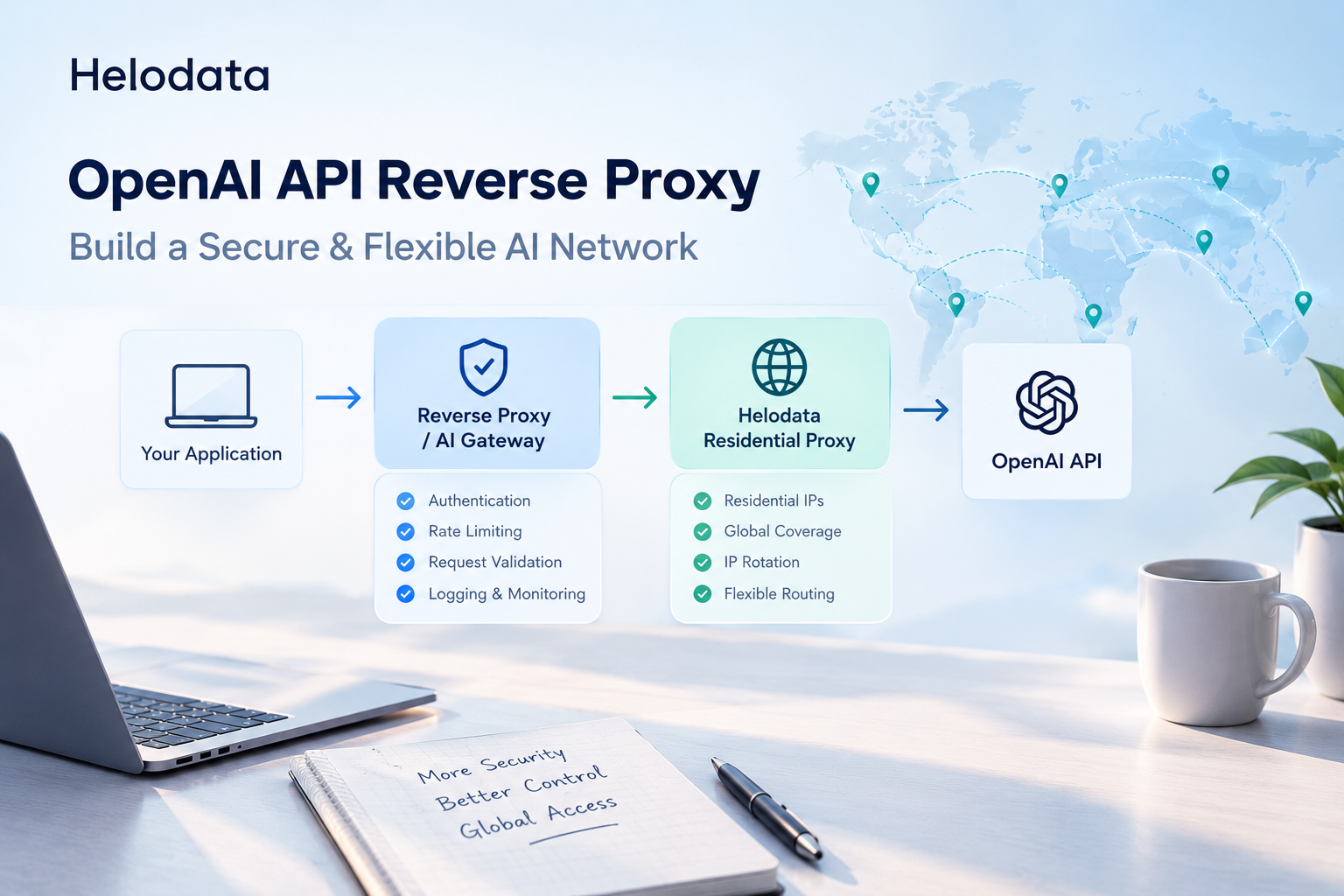
How to Build an OpenAI API Reverse Proxy: Architecture, NGINX, Security, and Proxy Networking
Learn how to build an OpenAI API reverse proxy with NGINX, protect API keys, manage traffic, and integrate residential proxies for flexible AI networking.

As AI applications move from simple experiments to production systems, developers increasingly need more than a direct connection to an AI API.
API key security, user-level rate limiting, request monitoring, model routing, streaming responses, and network stability all become important once an application serves multiple users or runs automated AI workflows.
One practical solution is to place a reverse proxy or AI gateway between your application and the OpenAI API.
But there is another networking layer worth considering: the outbound IP environment.
For applications that need stable connections, geographic flexibility, or different outbound IPs for specific workflows, a residential proxy can complement the reverse proxy architecture.
This article explains how the two layers can work together.
What Is an OpenAI API Reverse Proxy?
An OpenAI API reverse proxy is a server-side gateway that receives requests from your application and forwards them to OpenAI.
Instead of exposing the OpenAI API directly to every client:
Client
↓
Your Application
↓OpenAI API
you introduce an intermediate gateway:
Client
↓
Your Application
↓
Reverse Proxy
↓OpenAI API
The reverse proxy becomes the controlled entry point for API traffic.
This allows developers to keep sensitive API credentials on the server while adding additional controls around authentication, rate limiting, logging, routing, and network configuration.
OpenAI recommends treating API keys as secrets and not exposing them in browser-side or client-side code.
Why Put a Reverse Proxy in Front of an AI API?
For a small personal project, a direct API connection may be enough.
Production AI applications are different.
A reverse proxy can provide several important functions.
1. Protect API Keys
The client does not need direct access to your OpenAI API key.
Instead:
User
↓
Your Backend
↓
Reverse Proxy
↓OpenAI
The credential stays on the server side.
This is especially important when your application has web users, mobile clients, or third-party integrations.
2. Control User Traffic
A reverse proxy can identify users and apply different limits.
For example:
Free User → 10 requests/minute
Standard User → 60 requests/minuteEnterprise → 300 requests/minute
This prevents one user or automated process from consuming the entire API budget.
3. Centralize Logging
Instead of collecting API logs across multiple applications, the gateway can provide a centralized request layer.
You can track:
- Request ID
- User ID
- Model
- Response status
- Latency
- Token usage
- Error rate
- Network failures
Sensitive request content should only be logged when necessary and should be handled according to your privacy requirements.
4. Add Network-Level Control
This is where an additional proxy layer can become useful.
The reverse proxy controls application traffic.
A residential proxy controls the outbound network path.
These are different responsibilities.
Reverse Proxy vs Residential Proxy
These two proxy types are often confused, but they solve different problems.
Technology | Main Function |
|---|---|
Reverse Proxy | Controls incoming application/API traffic |
Residential Proxy | Provides residential outbound IP connectivity |
Datacenter Proxy | Provides datacenter-based outbound IP connectivity |
AI Gateway | Adds routing, authentication, monitoring, and AI-specific controls |
A reverse proxy does not automatically give your application a residential IP.
Likewise, a residential proxy does not replace the API gateway logic of a reverse proxy.
They can, however, work together.
How Helodata Can Fit Into an AI Proxy Architecture
For AI applications that require flexible outbound connectivity, Helodata residential proxies can be added after the reverse proxy layer.
A typical architecture could look like this:
┌─────────────────────┐
│ Users │
└──────────┬──────────┘
│
▼
┌─────────────────────┐
│ AI Application │
└──────────┬──────────┘
│
▼
┌─────────────────────┐
│ Reverse Proxy │
│ / AI Gateway │
│ │
│ • Authentication │
│ • Rate Limiting │
│ • Request Routing │
│ • Logging │
└──────────┬──────────┘
│
▼
┌─────────────────────┐
│ Helodata Residential│
│ Proxy Network │
│ │
│ • Residential IPs │
│ • Geo flexibility │
│ • IP rotation │
└──────────┬──────────┘
│
▼
┌─────────────────────┐
│ External AI APIs │ └─────────────────────┘
This architecture is useful when your application needs to separate API management from network management.
For example, the reverse proxy can determine which user is allowed to send a request, while Helodata handles the outbound proxy connection used by the application.
When Would an AI Application Need a Residential Proxy?
Not every OpenAI API application needs a residential proxy.
If your application simply sends API requests from a fixed cloud server, a standard server connection may be sufficient.
A residential proxy becomes more relevant when the surrounding workflow depends on network location or IP diversity.
Potential use cases include:
AI-Powered Web Automation
AI agents increasingly interact with websites, APIs, search systems, and other external services.
In these workflows, the AI model is only one part of the system.
The application also needs a reliable network connection for outbound requests.
A residential proxy can provide a different outbound IP environment for those requests.
Geographic Testing
Developers may need to test how an AI-powered application behaves from different regions.
Instead of running a separate server in every location, a proxy network can provide geographically distributed IP access.
Automated Research Workflows
AI research agents may collect information from multiple external sources.
The network layer can be separated from the AI logic:
AI Agent
↓
Task Manager
↓
Reverse Proxy
↓
Residential Proxy
↓External Websites / APIs
This makes the architecture easier to manage as the number of workflows increases.
Multi-Region Applications
Applications serving users in different markets may need to understand regional network conditions.
A flexible proxy layer can make it easier to test and manage these environments without redesigning the entire application infrastructure.
Setting Up a Basic NGINX Reverse Proxy
NGINX is commonly used as a reverse proxy and can also be used as part of an AI gateway architecture.
A basic configuration might look like this:
server {
listen 443 ssl;
server_name api.example.com;
location /v1/ {
proxy_pass https://api.openai.com/v1/;
proxy_set_header Host api.openai.com;
proxy_set_header Authorization "Bearer $OPENAI_API_KEY";
proxy_ssl_server_name on;
}}
In production, API credentials should not simply be hard-coded into configuration files.
Use environment variables or a dedicated secrets management system instead.
Streaming Responses and SSE
AI applications often use streaming responses instead of waiting for the entire response to complete.
OpenAI supports streaming responses using server-sent events when streaming is enabled.
The request flow becomes:
Client
↓
Reverse Proxy
↓
OpenAI API
↓
Streaming Events
↓
Reverse Proxy
↓Client
The proxy layer must be configured correctly so that streaming data is forwarded without unnecessary buffering.
Otherwise, users may experience a delay even though the model is already generating output.
This is especially important for:
- AI chat interfaces
- Coding assistants
- AI agents
- Real-time dashboards
- Long-running AI tasks
API Key Security
The reverse proxy should be the layer responsible for communicating with OpenAI using the protected API credential.
The client should never receive the actual API key.
A better architecture is:
Browser
↓
Application Authentication
↓
AI Gateway
↓
Secret Management
↓OpenAI API
OpenAI recommends loading API keys securely on the server rather than exposing them in client-side applications.
For larger systems, consider using:
- Environment variables
- Secret managers
- Key rotation
- Access controls
- Separate credentials for different environments
Multi-Layer Rate Limiting
Rate limiting should not rely on a single layer.
For example:
Global Limit
↓
Application Limit
↓
User Limit
↓
Endpoint Limit
↓OpenAI API
You can also apply different limits based on:
- User ID
- API key
- IP address
- Account type
- Model
- Endpoint
- Request frequency
This becomes particularly important when AI agents generate many requests automatically.
Request Validation
A reverse proxy should not blindly forward every request.
Before sending traffic to the upstream API, your gateway can validate:
- Authentication
- HTTP method
- Request size
- Allowed models
- Required parameters
- User permissions
- Request frequency
For example, you may allow regular users to access selected models while restricting expensive models to specific accounts.
This turns the reverse proxy into an actual AI traffic control layer, rather than simply a forwarding server.
Using Helodata for Outbound Proxy Connectivity
If your application requires residential IP connectivity, Helodata can be integrated at the network layer rather than replacing your reverse proxy.
For example:
Application Layer
│
▼
┌───────────────────┐
│ Reverse Proxy │
│ Authentication │
│ Rate Limiting │
│ Request Routing │
└─────────┬─────────┘
│
▼
Network Layer
│
┌───────────────────┐
│ Helodata Proxy │
│ Residential IP │
│ Rotation / Geo │
└─────────┬─────────┘
│
▼ Internet
Helodata provides residential proxy IPs that can be used when an application needs a residential outbound network environment.
This can be useful for AI automation, web-based agents, research workflows, and applications where IP location or network flexibility matters.
The important architectural principle is to keep these responsibilities separate:
Reverse proxy = application control
Residential proxy = network connectivity
That separation makes the system easier to maintain and scale.
Should You Use a Residential Proxy for Every OpenAI Request?
No.
A residential proxy should be used based on the actual network requirements of your application.
For a backend service that simply communicates with the OpenAI API, a normal server connection may be sufficient.
A residential proxy becomes more useful when the application also needs to interact with external websites, regional services, or other network-dependent resources.
For example:
AI API Request
│
└── Standard Server Connection
AI Web Agent
│
└── Residential Proxy
AI Research Platform
│
├── OpenAI API
│ └── Residential Proxy
The goal is not to add another proxy simply because it is available.
The goal is to use the right network layer for the right workload.
Scaling the Architecture
As traffic increases, a single NGINX instance may no longer be enough.
A larger architecture might look like:
Load Balancer
│
┌─────────────┴─────────────┐
▼ ▼
AI Gateway #1 AI Gateway #2
│ │
└─────────────┬─────────────┘
│
Proxy Management
│
Helodata Network
│ External Services
You can then introduce additional infrastructure such as:
- Redis for rate limiting
- PostgreSQL for usage data
- Prometheus for metrics
- Grafana for monitoring
- Centralized logging
- Multiple proxy pools
- Automatic failover
NGINX can also be used as part of more advanced AI proxy architectures that route requests between different model providers.
Production Deployment Checklist
Before deploying an OpenAI reverse proxy to production, check the following:
Security
- Keep API keys server-side
- Use HTTPS
- Implement authentication
- Validate incoming requests
- Restrict administrative endpoints
- Rotate credentials when necessary
Traffic Management
- Configure per-user rate limits
- Set request timeouts
- Handle upstream errors
- Add retry logic carefully
- Monitor request volume
Streaming
- Test SSE responses
- Avoid unnecessary response buffering
- Verify connection timeouts
- Test interrupted streams
Network
- Determine whether a standard server IP is sufficient
- Use residential proxies only where the workflow requires them
- Choose appropriate geographic locations
- Monitor proxy availability and latency
Observability
Track:
- Request ID
- Response status
- Latency
- Model
- Token usage
- Error rate
- Proxy connection status
Final Thoughts
An OpenAI reverse proxy is more than a way to forward API requests.
When designed correctly, it becomes an AI traffic management layer that can handle authentication, rate limiting, request validation, monitoring, routing, and security.
At the same time, AI applications that interact with external websites and services may have additional network requirements.
This is where a residential proxy layer can complement the architecture.
Instead of treating the two technologies as competitors, think of them as different layers:
Reverse Proxy → controls the application traffic
Residential Proxy → controls the outbound network environment
For AI agents, automation systems, research platforms, and other network-dependent workflows, combining these layers can provide a more flexible foundation for scaling.
With Helodata residential proxies, developers can add residential IP connectivity to the network layer while keeping their AI gateway responsible for authentication, traffic control, and application logic.
The result is a cleaner architecture:
Application → AI Gateway → Helodata Residential Proxy → External Network
The right architecture is not about adding as many proxy layers as possible. It is about giving each layer a clear responsibility—and making sure your AI application can remain secure, stable, and flexible as it grows.