Why Residential Proxies Stop Working: A Technical Troubleshooting Guide
Residential proxies can fail because of IP reputation, authentication, network issues, session settings, rotation, or target-site restrictions. Learn how to diagnose proxy failures and build a more stable setup with the right IP and session strategy.

Residential proxies are widely used for web scraping, market research, SERP tracking, ad verification, e-commerce intelligence, social media management, and other workflows that require traffic to appear as if it is coming from real residential networks.
However, even a residential proxy with a high-quality IP pool can occasionally fail.
A proxy may work normally for several hours and then suddenly return errors. A previously accessible website may start showing CAPTCHAs or 403 responses. Sometimes the connection itself becomes slow, while in other cases the proxy works perfectly on one website but fails on another.
The first instinct is often to assume that the residential proxy is broken.
But technically, that's only one possibility.
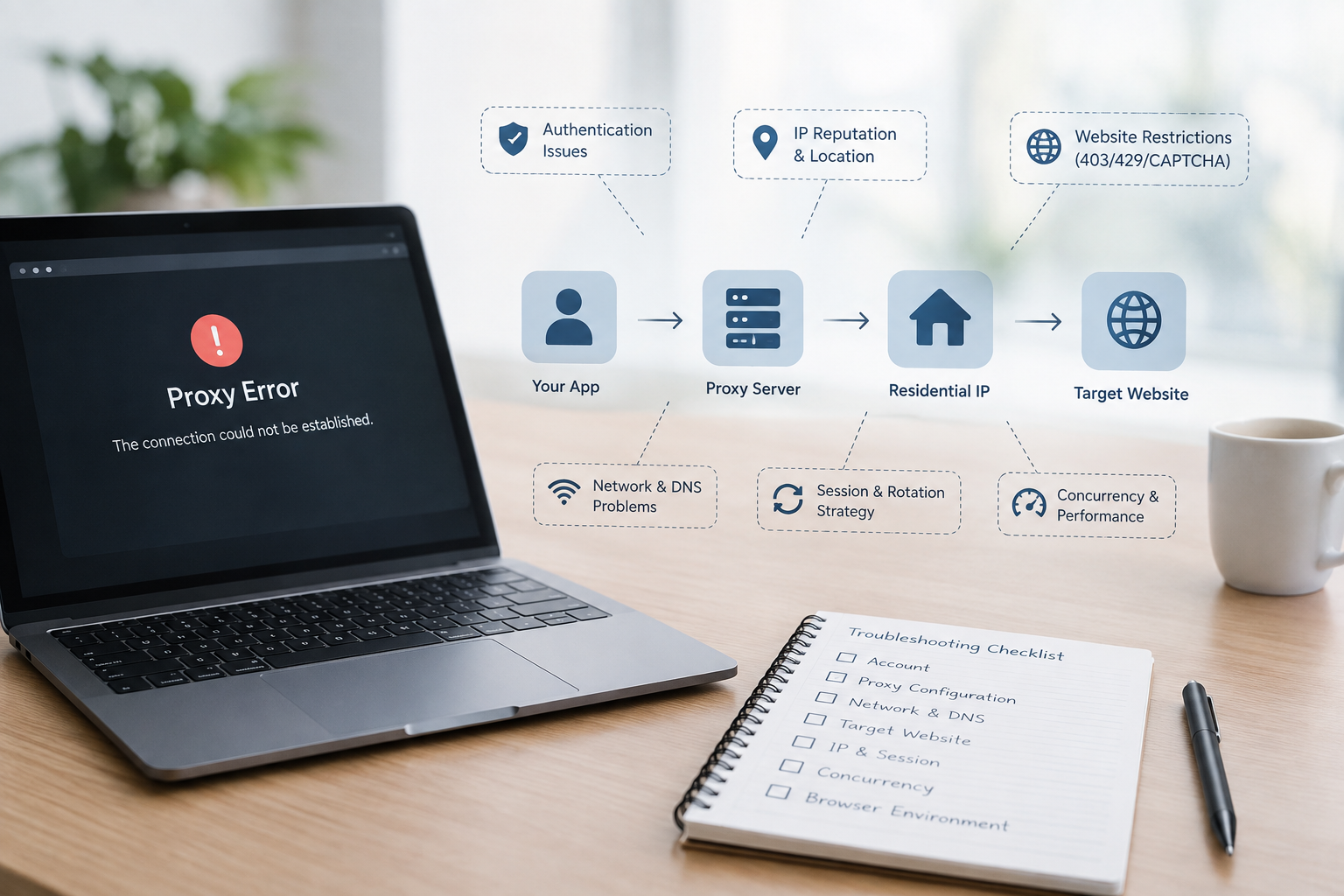
A proxy request passes through multiple layers:
Application → Local Network → Proxy Gateway → Residential IP → Target Website → Response
A failure at any point can make the entire connection look like a proxy problem.
This guide explains why residential proxies stop working, how to identify the actual failure point, and how to build a more stable residential proxy setup with the right IP, session, rotation, and routing strategy.
What Does It Mean When a Residential Proxy “Stops Working”?
Before troubleshooting, you need to identify what has actually failed.
There are several common scenarios.
1. The proxy cannot establish a connection
Typical errors include:
- Connection timeout
- Connection refused
- Proxy connection failed
- DNS resolution error
- 407 Proxy Authentication Required
- TLS/SSL errors
These problems are often related to proxy configuration, authentication, networking, or the proxy endpoint.
2. The proxy connects, but the target website rejects the request
You may successfully connect through the proxy, but the website returns:
- 403 Forbidden
- 429 Too Many Requests
- CAPTCHA
- Access Denied
- Redirect loops
- Empty responses
In this situation, the proxy may be functioning correctly.
The target website is simply rejecting the request based on its own security or traffic rules.
3. The proxy becomes slow
A proxy can also appear to have “stopped working” when latency increases significantly.
Possible causes include:
- Long network routes
- Temporary ISP congestion
- An unstable residential endpoint
- Excessive concurrent connections
- High request volume
- Target-side throttling
4. The IP keeps changing
For rotating residential proxies, changing IPs is normally expected behavior.
The problem occurs when your application requires a consistent IP for a multi-step workflow.
For example:
Login → Browse → Submit → Checkout
If the IP changes halfway through this process, the target website may invalidate the session.
The proxy isn't necessarily malfunctioning.
Your session strategy may simply be unsuitable for the workflow.
Understanding the Residential Proxy Request Path
A useful way to troubleshoot residential proxy issues is to understand what happens behind a single request.
Suppose your application requests:
The request can be simplified as:
Your Application
↓
Proxy Authentication
↓
Residential Proxy Gateway
↓
Residential Exit IP
↓
Target Website
↓
Response
Each layer has its own potential failure point.
For example:
- Incorrect credentials can stop authentication.
- A network problem can prevent the gateway from being reached.
- An unavailable residential endpoint can cause a timeout.
- An unhealthy IP can trigger target-side restrictions.
- Excessive requests can trigger rate limiting.
- Browser and IP inconsistencies can trigger anti-bot systems.
This is why replacing the proxy immediately isn't always the best troubleshooting method.
First, determine which layer has failed.
Step 1: Check Whether the Proxy or the Target Website Is the Problem
One of the most useful diagnostic methods is to compare different requests.
Assume your target website is:
example.com
Start with three tests.
Test A: Access the website without a proxy
If the website does not work even without a proxy, the problem may be unrelated to your residential proxy.
Test B: Use the proxy against another website
If the proxy works normally elsewhere, the proxy connection itself is probably healthy.
Test C: Use the proxy against the original target
If the proxy works on multiple websites but consistently fails on one domain, investigate the target website's access rules.
This distinction is important.
A proxy connection failure and a website access failure are two different problems.
Step 2: Verify Your Proxy Configuration
Configuration errors are one of the simplest causes of proxy failures.
Check:
- Hostname
- Port
- Username
- Password
- Proxy protocol
- Authentication method
- IP whitelist
- Target location
- Rotation mode
- Session configuration
Residential proxy services commonly support HTTP, HTTPS, and SOCKS5.
For example, Helodata's residential proxy network supports HTTP, HTTPS, and SOCKS5, with both username/password authentication and IP allow-list options.
The protocol selected in your application must match the protocol supported by your proxy endpoint.
A technically healthy proxy can still fail if your application is sending requests through the wrong protocol or port.
Step 3: Check Authentication
Authentication problems can make a working residential IP appear completely unavailable.
One common response is:
407 Proxy Authentication Required
This usually indicates that the proxy server rejected the authentication information.
Check:
- Username
- Password
- Authentication format
- Account status
- Traffic balance
- IP whitelist
- API credentials
IP Allow-Listing
If your proxy account uses IP-based authentication, check whether your current public IP is still authorized.
For example:
Your original IP:
203.0.113.10
Current IP:
203.0.113.25
If only the first address is allow-listed, proxy requests may suddenly fail after your local network changes.
In this case, the residential IP itself is not necessarily the problem.
Step 4: Check Whether Your Residential IP Has Changed
Residential proxies are different from traditional dedicated proxies because the exit IP can change.
Depending on your configuration, an IP may change when:
- A session expires
- The residential endpoint becomes unavailable
- The rotation interval is reached
- A different IP is selected
- The provider removes an unhealthy endpoint
For rotating workloads, this is expected.
But some applications require IP continuity.
Consider a workflow such as:
Login
↓
Open account page
↓
Submit information
↓
Complete transaction
If the IP changes between these steps, the website may consider the activity suspicious.
This is where sticky sessions become useful.
Rotating vs. Sticky Residential Sessions
Choosing the correct session mode is one of the most important decisions when using residential proxies.
Rotating Sessions
A rotating session periodically changes the residential IP.
This is useful for workflows where IP diversity is more important than maintaining a single identity.
Common examples include:
- Large-scale web scraping
- SERP collection
- Price monitoring
- Market research
- Public data collection
Sticky Sessions
A sticky session keeps the same residential IP for a defined period.
This is more appropriate for workflows that require continuity.
Examples include:
- Multi-step browsing
- Login sessions
- Shopping workflows
- Account management
- Pagination-heavy browsing
Helodata supports both rotating and sticky residential sessions, with sticky sessions available for up to 30 minutes depending on the configuration.
The important point is:
Don't choose a rotation strategy simply because more IP changes sound safer. Choose it according to how your application works.
Step 5: Check the Target Website's Response Code
HTTP status codes can provide useful clues.
403 Forbidden
A 403 means the server understood the request but refused to fulfill it.
Possible causes include:
- IP reputation
- Geographic restrictions
- Security rules
- Suspicious request patterns
- Missing headers
- Account restrictions
If the proxy works on other websites but consistently receives 403 responses from one target, investigate the target site's restrictions first.
429 Too Many Requests
A 429 usually indicates that the target has detected excessive request volume.
For example:
500 requests in 30 seconds
may trigger rate limiting even if every request comes from a residential IP.
Simply adding more IPs is not always the correct solution.
You should also evaluate:
- Request frequency
- Concurrency
- Retry logic
- Session behavior
- Account-level limits
Using controlled request rates and backoff strategies can often improve stability.
CAPTCHA
A CAPTCHA is another important signal.
It doesn't necessarily mean the IP is permanently blocked.
The target website may be evaluating multiple signals, including:
- IP reputation
- Request frequency
- Cookies
- Browser behavior
- User-Agent
- Session history
- Geographic consistency
Changing the IP alone may therefore not solve the problem.
Step 6: IP Reputation Can Change
A residential IP does not have a permanent reputation score.
Its reputation can change over time.
An IP that works today may encounter restrictions tomorrow because:
- The target website updated its security rules.
- The IP was previously associated with suspicious activity.
- The website's reputation database changed.
- The IP was reassigned by the ISP.
- The target introduced stricter detection.
This is why the size and health of a residential IP pool matter.
Helodata operates a residential pool of 80M+ IPs across 195 countries, with routing designed to evaluate factors such as IP health, geographic fit, and historical success before selecting an endpoint.
The goal isn't simply to have millions of IPs.
The important question is:
How effectively can unhealthy or unsuitable IPs be identified and replaced?
Step 7: Geographic Mismatch Can Cause Problems
Location is another common reason for unexpected proxy failures.
Suppose your application is designed to access a Japanese website.
Your proxy IP is located in Germany.
At the same time:
- Browser language is Japanese
- Time zone is Japan
- IP location is Germany
- DNS location is different
The target website may see an inconsistent environment.
For location-sensitive workflows, the proxy should match the intended geographic requirement as closely as possible.
Helodata supports residential IP targeting across 195 countries, with city-level targeting and additional geographic options available depending on the plan.
For example, Japan-specific proxy coverage can be targeted across major cities including Tokyo, Osaka, Yokohama, Nagoya, Sapporo, Fukuoka, Kyoto, and others.
This can be useful for:
- Local SERP monitoring
- E-commerce research
- Ad verification
- Market research
- Regional content testing
Step 8: Check DNS and Routing
DNS problems are easy to overlook.
A simplified request looks like:
Domain → DNS resolution → Target IP → Connection
If DNS resolution fails, the proxy may appear to be unavailable even though the proxy gateway itself is working.
You should check:
- Can the domain be resolved?
- Can the proxy gateway be reached?
- Is DNS being resolved locally or through the proxy?
- Is the routing path consistent with the requested location?
For geographically sensitive tasks, inconsistent DNS and proxy locations can sometimes create additional signals for the target website.
Step 9: Don't Ignore Browser Fingerprints
A proxy is only one part of a browsing environment.
Consider this configuration:
- Residential IP: Japan
- Browser timezone: United States
- Browser language: English
- WebRTC location: another region
- User-Agent: outdated
- Cookies: from a different IP/location
The residential IP itself may be perfectly legitimate.
But the overall environment is inconsistent.
Modern websites can evaluate multiple signals rather than relying on IP address alone.
For browser-based workflows, proxy configuration should therefore be considered together with:
- Cookies
- User-Agent
- Time zone
- Language
- Browser version
- WebRTC behavior
- Session consistency
This is particularly important for users working with Playwright, Puppeteer, Selenium, anti-detect browsers, or similar automation environments.
Step 10: Check Concurrency
Another common cause of instability is excessive concurrency.
Imagine one proxy configuration generating hundreds or thousands of simultaneous requests.
Even a healthy residential network can experience:
- Higher latency
- More connection timeouts
- Increased packet loss
- Connection queueing
- Target-side rate limiting
More concurrency does not always mean more throughput.
A better approach is to gradually increase concurrency while monitoring:
- Success rate
- Latencies
- Timeout rate
- HTTP status codes
- Bandwidth consumption
Helodata supports high-concurrency residential workloads, but application-level request management is still important for maintaining stable traffic behavior.
Step 11: Test the Proxy Independently
If your application fails, remove as many variables as possible.
For example, test the proxy through cURL:
curl -x http://USERNAME:PASSWORD@HOST:PORT https://example.com
For SOCKS5:
curl --proxy socks5://USERNAME:PASSWORD@HOST:PORT https://example.com
The exact command depends on your proxy configuration.
The purpose is simple:
Can the proxy establish a basic connection outside the application?
If cURL works but your application doesn't, investigate the application configuration.
If cURL also fails, continue checking:
- Credentials
- Network
- Proxy endpoint
- DNS
- Target website
- IP availability
Helodata uses standard proxy protocols, so existing applications can generally connect through standard HTTP/HTTPS/SOCKS5 configurations without requiring a proprietary SDK.
A Practical Residential Proxy Troubleshooting Workflow
When a residential proxy suddenly stops working, use this sequence.
1. Check your account
Verify:
- Account status
- Traffic balance
- Subscription
- Credentials
2. Check the proxy configuration
Verify:
- Host
- Port
- Protocol
- Username
- Password
- Authentication
3. Test the proxy independently
Use cURL or another basic HTTP client.
4. Test another website
If another website works, the original target may be the problem.
5. Check the response
Identify whether the result is:
- 403
- 407
- 429
- 5xx
- Timeout
- Connection refused
6. Check the current IP
Verify:
- Country
- City
- ISP/ASN
- IP type
7. Review session settings
Ask:
Should this workflow use rotating or sticky sessions?
8. Reduce concurrency
Lower the request rate and compare the results.
9. Check browser consistency
Review:
- Cookies
- User-Agent
- Time zone
- Language
- WebRTC
10. Try another endpoint
If the problem appears isolated to one residential IP, switch to another healthy endpoint.
How Helodata Helps Reduce Residential Proxy Failures
Troubleshooting individual proxy failures is unavoidable in some workflows.
The bigger goal, however, is to reduce how often users encounter these problems in the first place.
This is where proxy network architecture matters.
1. Large Residential IP Pool
Helodata provides 80M+ residential IPs across 195 countries, giving applications access to a broad pool of residential endpoints.
A larger and more geographically diverse pool provides more flexibility when a particular IP becomes unavailable or unsuitable for a target.
2. Smart IP Selection
Not every IP should be treated equally.
Helodata's residential routing evaluates IP health, geographic fit, and historical success when selecting endpoints, while unhealthy IPs can be retired automatically.
This reduces the need for users to manually test every IP.
3. Flexible Rotation
Different workflows need different IP strategies.
Helodata supports both:
Rotating sessions
and
Sticky sessions
This allows users to choose between IP diversity and session continuity without rebuilding their proxy configuration.
4. Precise Geographic Targeting
Country-level targeting may not be enough for some applications.
Local search results, e-commerce pricing, advertising verification, and market research can all depend on location.
Helodata supports geographic targeting across 195 countries, with city-level targeting and additional ZIP/ASN options available depending on the plan.
5. Multiple Proxy Protocols
A proxy should fit into your existing infrastructure.
Helodata supports:
- HTTP
- HTTPS
- SOCKS5
This makes it easier to integrate residential proxies into applications, scraping frameworks, browser automation, and other tools without redesigning the entire networking layer.
6. Real-Time Monitoring
Proxy problems become much easier to solve when you can see what's happening.
Instead of waiting for a workflow to completely fail, monitor:
- Success rate
- Latency
- Traffic usage
- Request behavior
- Regional performance
Helodata provides real-time analytics for monitoring residential proxy performance and traffic usage.
This allows teams to identify abnormal performance earlier.
Choosing the Right Helodata Residential Proxy Strategy
There is no single configuration that works best for every project.
For large-scale scraping
Consider:
Rotating Residential + Geographic Targeting
This provides a larger pool of IPs and helps distribute requests across different residential endpoints.
For multi-step workflows
Consider:
Sticky Residential Sessions
Keeping the same IP during a workflow can reduce unnecessary session changes.
For local market research
Consider:
City-Level Residential Targeting
This is useful when country-level location is too broad.
For network-specific research
Consider:
ASN or Carrier Targeting
This provides more control over the network characteristics of the exit IP where supported.
For large production workloads
Consider:
High-volume residential plans + real-time monitoring
This allows teams to monitor performance while scaling traffic.
When Should You Replace the Proxy?
Not every failure means you should immediately change your proxy.
Replace or rotate an endpoint when:
- The IP repeatedly fails across multiple targets.
- The endpoint consistently times out.
- The IP has poor reputation.
- The residential connection becomes unstable.
- The target has clearly restricted the current IP.
But if the proxy works normally on other websites, changing IPs repeatedly may not solve the underlying issue.
You may instead need to investigate:
- Request frequency
- Browser behavior
- Cookies
- Session strategy
- Geographic consistency
- Account restrictions
The goal is to identify the root cause, not simply replace the IP every time an error appears.
Residential Proxy Troubleshooting Checklist
Before contacting your proxy provider, run through this checklist.
Account
- Account is active
- Sufficient traffic remains
- Credentials are correct
- Authentication method is correct
Proxy
- Host is correct
- Port is correct
- Protocol is correct
- Current IP is reachable
- IP location is correct
- Session mode is appropriate
Network
- Internet connection is stable
- DNS works
- Firewall isn't blocking the connection
- Proxy gateway is reachable
Target website
- Website works without a proxy
- Other websites work through the proxy
- Response code has been checked
- Rate limits have been considered
- CAPTCHA behavior has been checked
Application
- Request rate is reasonable
- Concurrency is controlled
- Cookies are consistent
- Browser configuration matches the proxy location
- Retry logic is configured
Final Thoughts
When a residential proxy stops working, the problem is rarely as simple as “the IP is dead.”
A residential proxy workflow involves multiple components, from local networking and authentication to IP selection, session management, routing, browser behavior, and target-site security.
The most effective approach is to troubleshoot the system layer by layer.
First determine whether the proxy can establish a connection.
Then determine whether the target website accepts the request.
After that, investigate authentication, IP reputation, location, session persistence, rotation frequency, concurrency, and browser consistency.
For production workloads, the quality of the underlying proxy network becomes equally important.
A large residential IP pool, flexible session control, geographic targeting, intelligent routing, and real-time performance monitoring can significantly reduce the amount of manual troubleshooting required.
Helodata combines these capabilities in a residential proxy network with 80M+ IPs across 195 countries, rotating and sticky sessions, multiple proxy protocols, geographic targeting, and real-time analytics.
The objective isn't simply to provide more IPs.
It's to make those IPs easier to control, monitor, and integrate into real-world workflows.
If your residential proxy suddenly stops working, don't replace everything immediately.
Identify the failed layer, adjust the configuration, and then choose the right proxy strategy for the workload.
That's the difference between simply using a proxy and building a reliable proxy infrastructure.